SeqNexus

← Overview

Every tool in the bench, from plasmid maps to NGS.

Every tool in SeqNexus, grouped by what you are doing with it. All of it is free, open source, and computed in your browser. The README has the algorithms, parameters and references behind each one.

ASequences

Sequence editing from a 20 bp oligo to a 5 Mb genome.

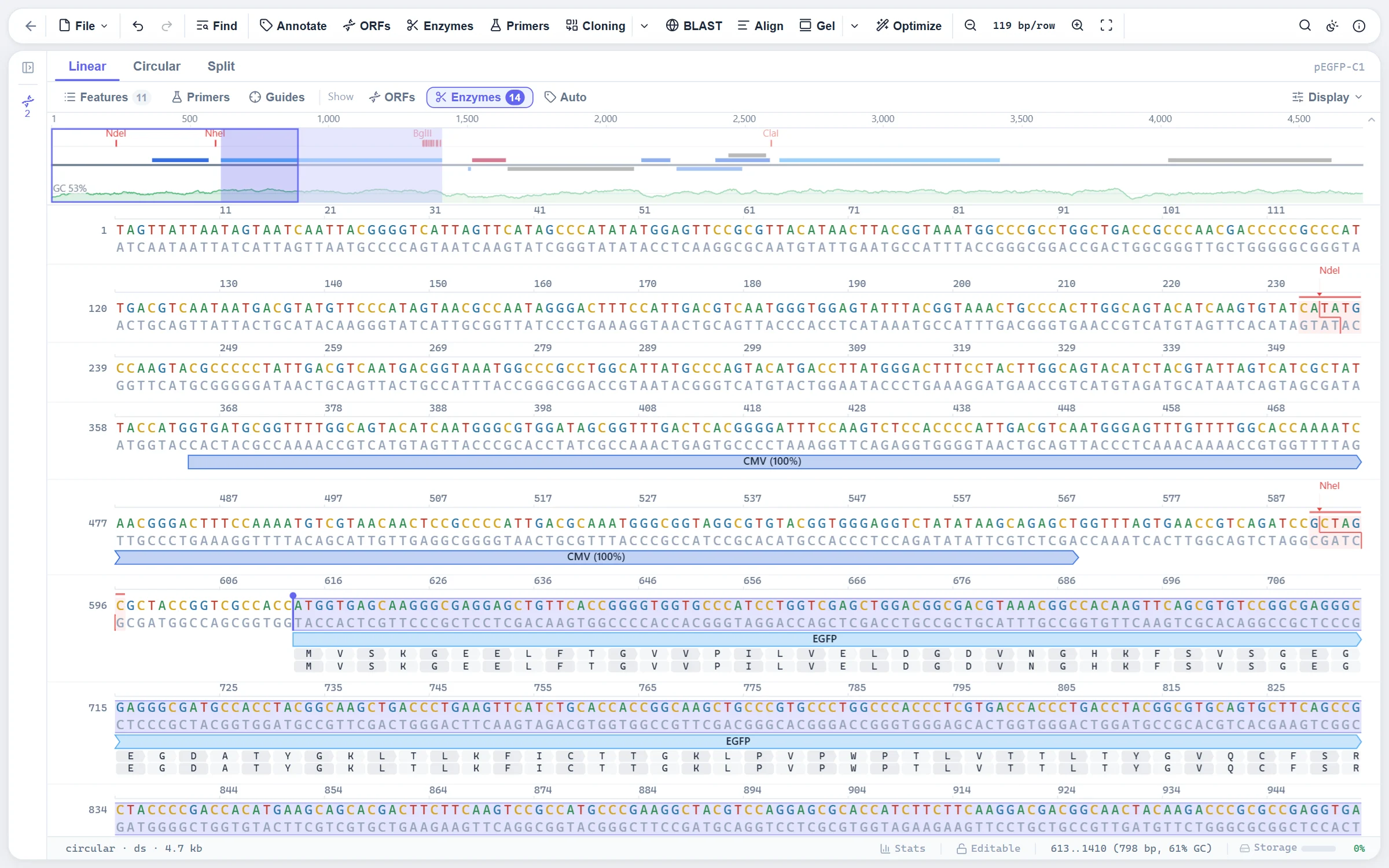
DNA and protein in a canvas-rendered view that stays quick from a 20 bp oligo to a bacterial genome. Type, paste and delete in place, select several ranges at once, and read the translation, the complement and the melting temperature of whatever is selected.
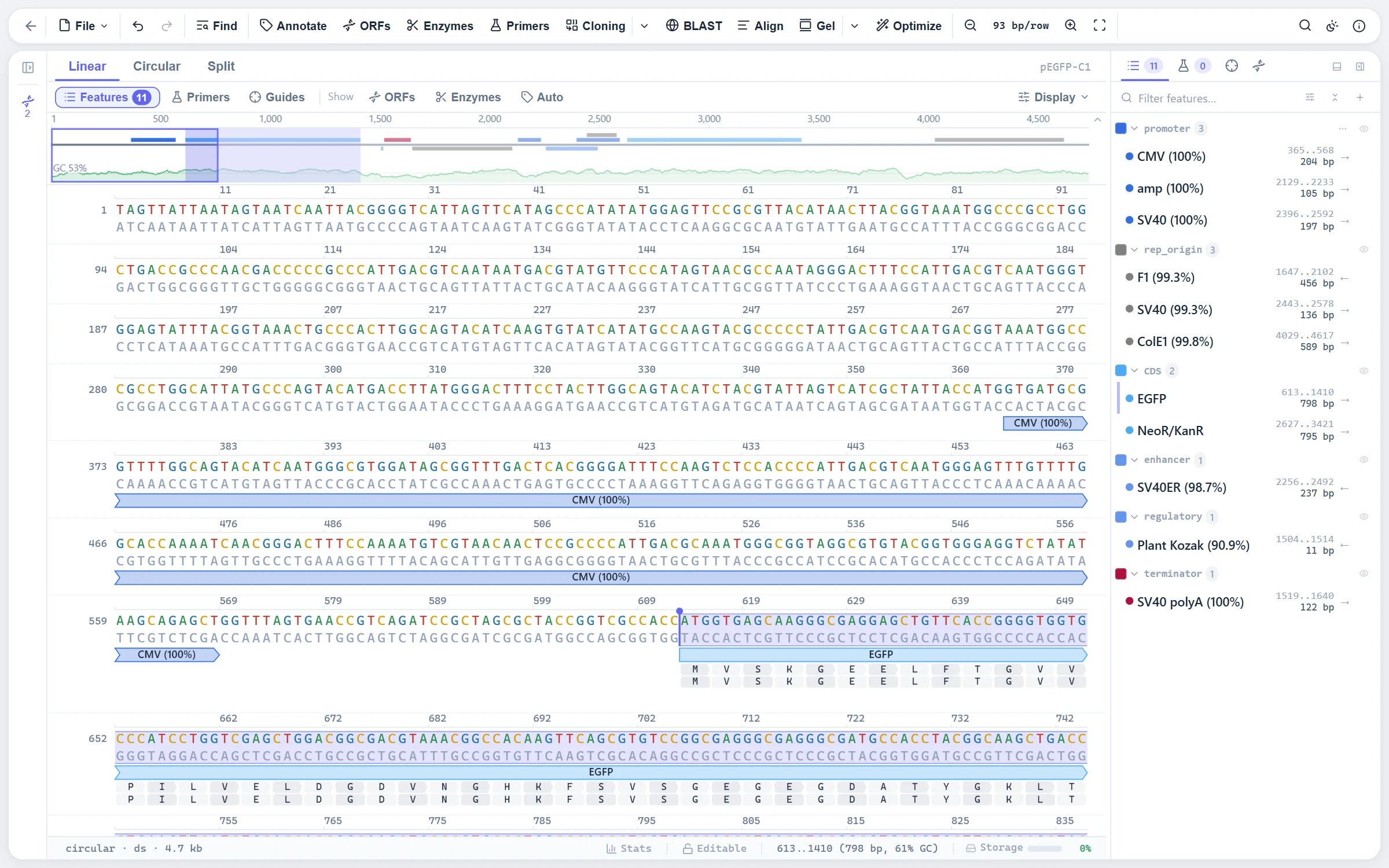
pEGFP-C1 in the sequence editor with the EGFP CDS selected, its translation and the feature panel
  • Genome scale. Tested to around 5 Mb; the canvas draws only what is on screen.
  • Three zoom modes. Line, dots and letters across 21 levels, with linear, circular and split views.
  • Several ranges at once. Ctrl-drag or Ctrl-click features; touching ranges merge and are copied, translated and annotated joined, as exons are.
  • Inline editing with undo. Insert, replace and delete in place; features move with the sequence.
  • Command palette and shortcuts. Every action reachable from the keyboard.
  • Ten themes. Five light and five dark, with the sequence colours adjusted for each.
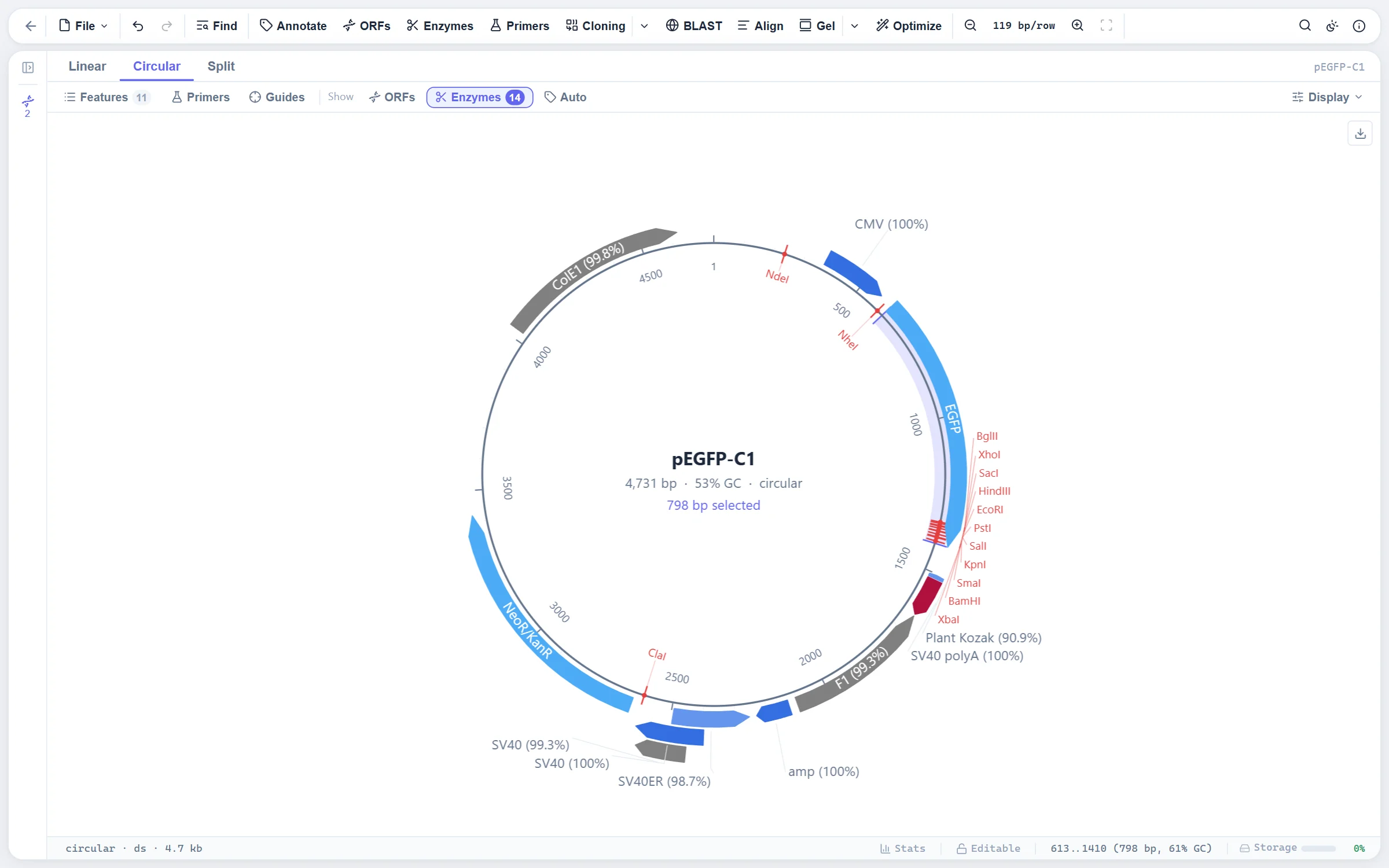
Plasmid maps with features, cut sites and tracks on rings.

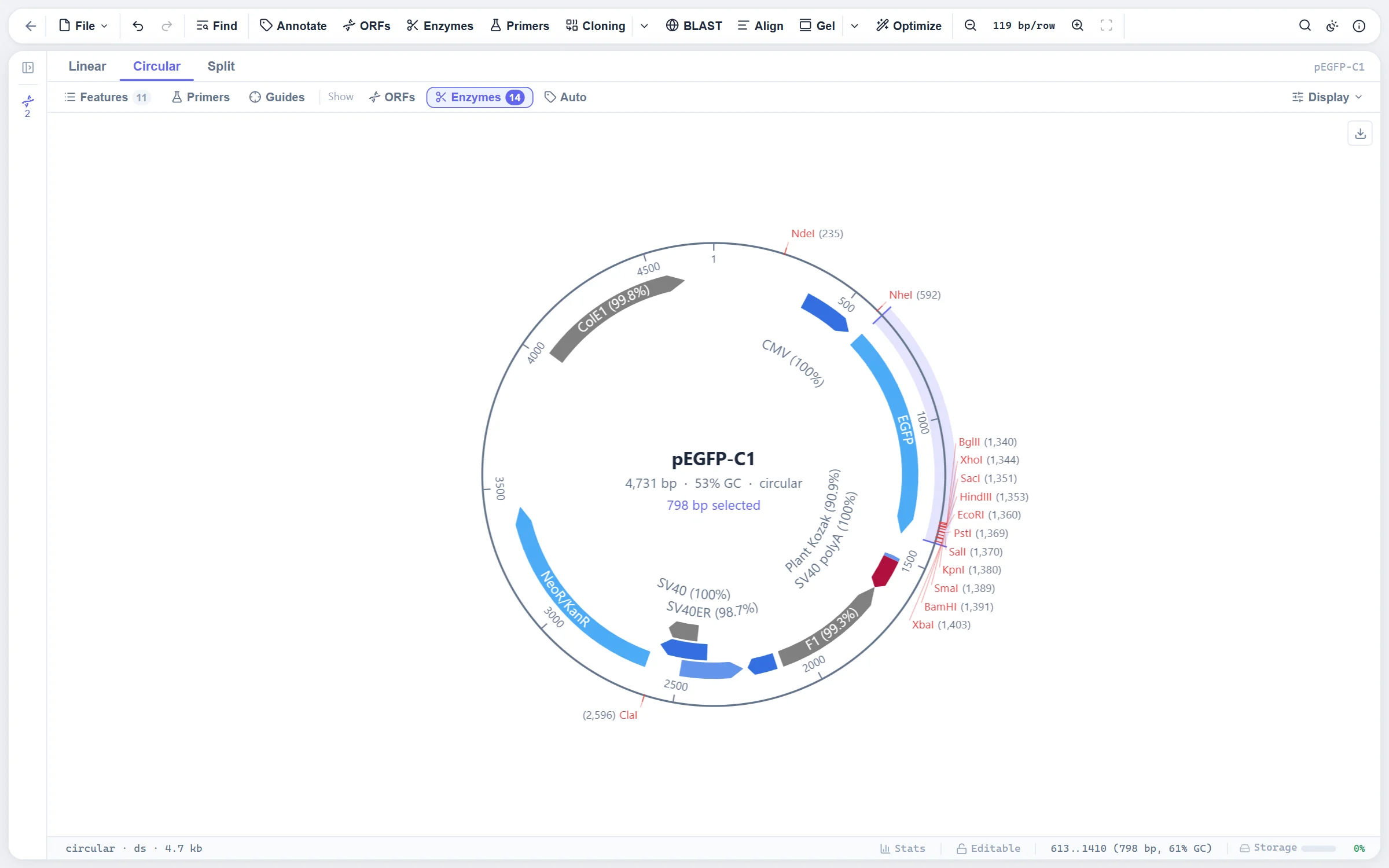
One scene drawn by two renderers: a canvas on screen and SVG or PDF on export, so the figure matches what you saw. Features, cut sites, ORFs and graph tracks sit on rings around the sequence, and the labels are placed so they never cross.

A circular plasmid map of pEGFP-C1 with features, cut sites and labels outside the ring
The same map in the sites-outside layout, every cut site named with its position
  • Two layouts. Names inside the ring, or features inside and every cut site named outside with its position.
  • Crowded spots stay readable. A run of nearby sites is listed beside the circle with its leaders kept apart.
  • Rings and tracks. Enzyme sites, ORFs, GC content and coverage as extra rings.
  • Work on the map. Click a feature to select it, drag to select a range, right-click for the same actions as in the sequence.

How the map is drawn: layouts, label placement, styles and export →

Feature annotation against a library of common plasmid parts.

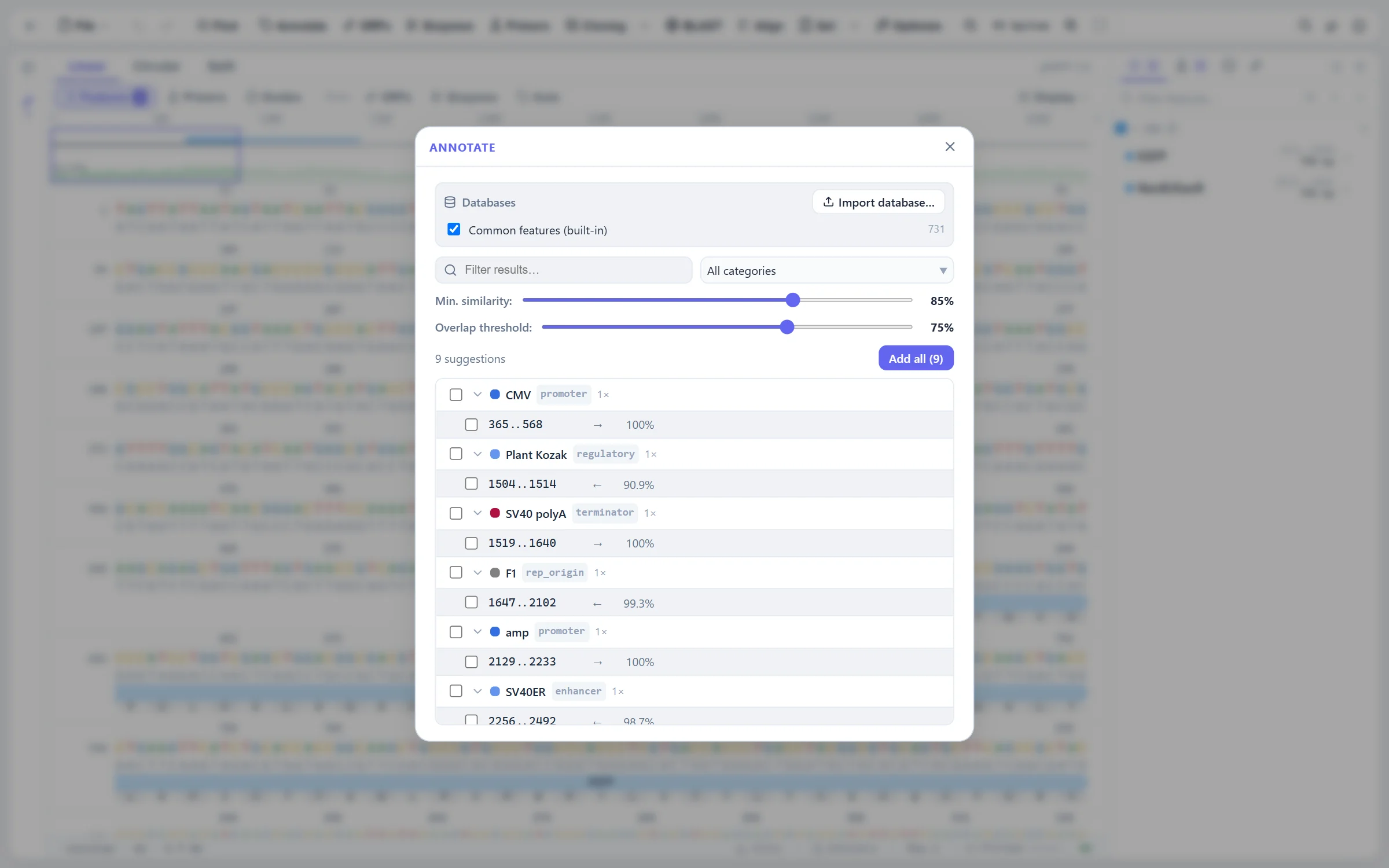
A feature panel grouped by type or sorted by position, with a filter that takes type:, len> and strand: terms. Auto-annotation scans the sequence against a built-in library of origins, resistance genes, promoters, tags and other common parts and proposes what it finds.

The Annotate dialog proposing promoters, origins and a terminator for pEGFP-C1 from the built-in library
  • CDS checks. Every coding feature is checked for its frame, start and stop, and the problems are shown next to it.
  • Joined features. Exons and other split features are one feature with several ranges, as GenBank writes them.
  • Follows the sequence. The panel scrolls with the selection and the sequence scrolls with the panel.
  • Built-in library. Hundreds of plasmid parts and protein tags, with the other versions of a part kept under their own names.

Nucleotide and protein search on both strands, and ORF finding.

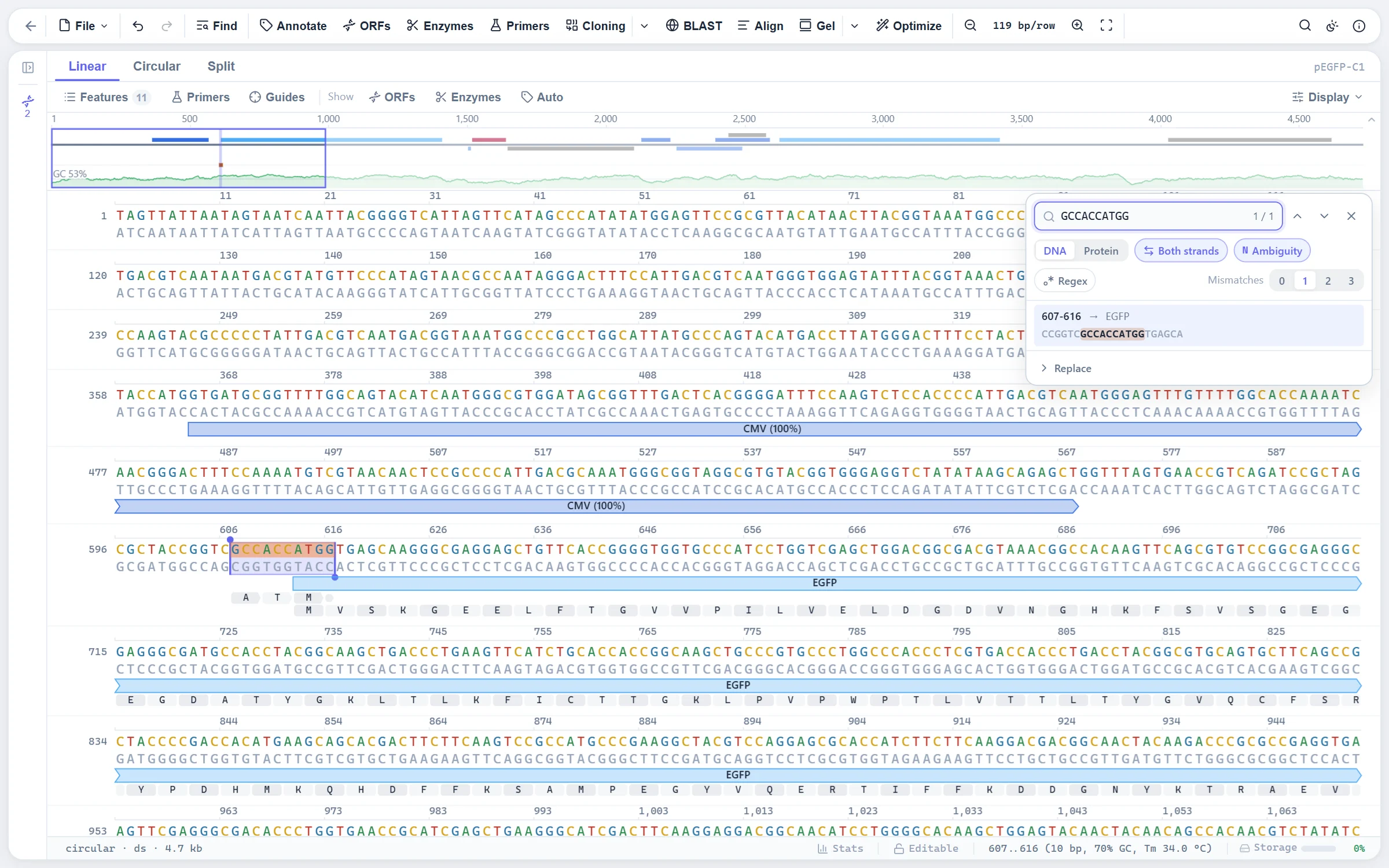
Nucleotide search with IUPAC codes, mismatches and regular expressions; protein search translated in all six frames; and replace. The six-frame ORF finder takes its start codons and minimum length from you and turns the ORFs it finds into features.

The find panel with a Kozak consensus search allowing one mismatch and its hit in context
  • Hits in context. A list with strand, overlapping feature and flanking sequence; click to jump.
  • Up to three mismatches. For primers and probes that do not match exactly.
  • ORFs as features. Keep the ones you want; the rest disappear when you close the finder.

Protein sequences with physicochemical properties and 3D structure.

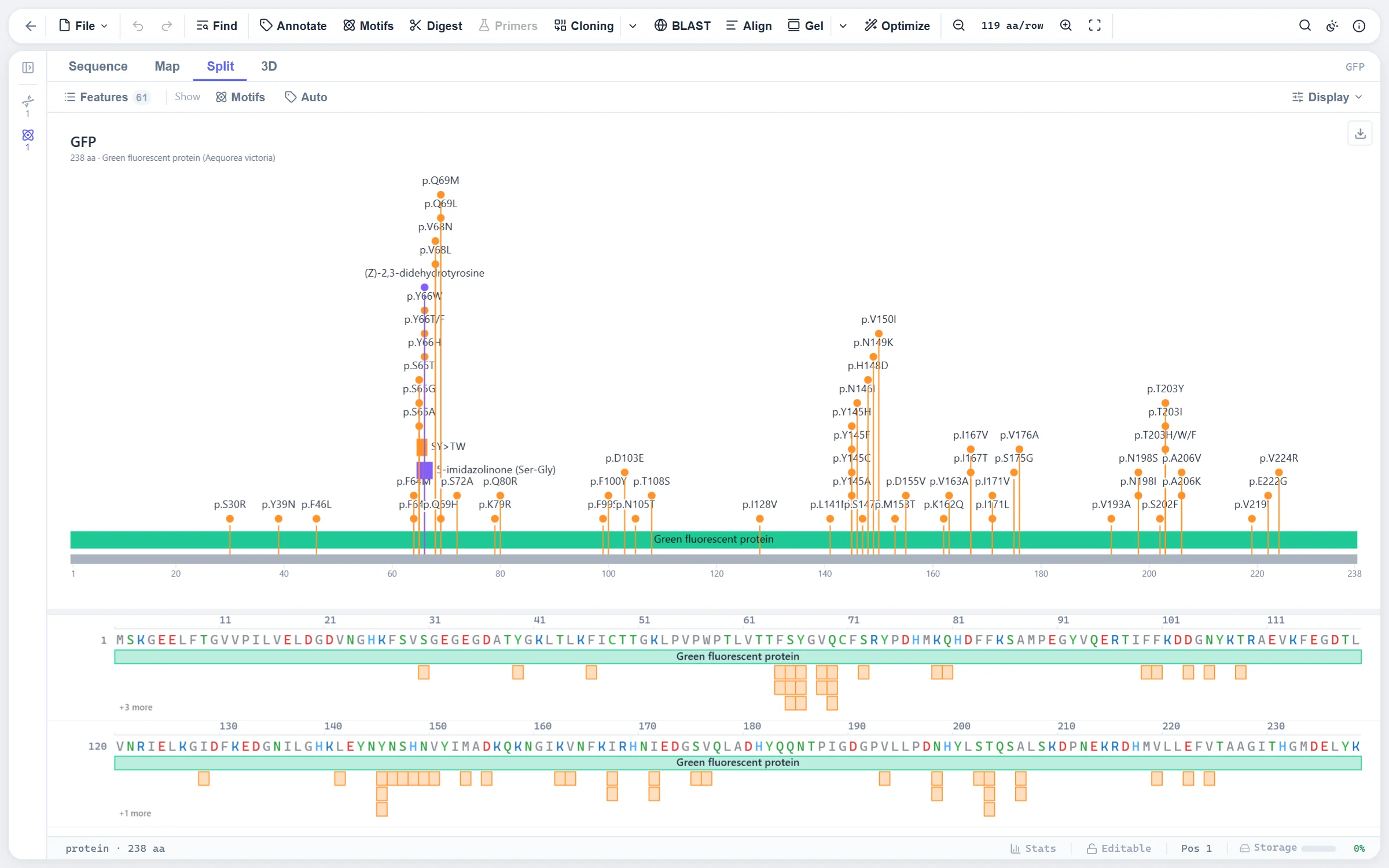
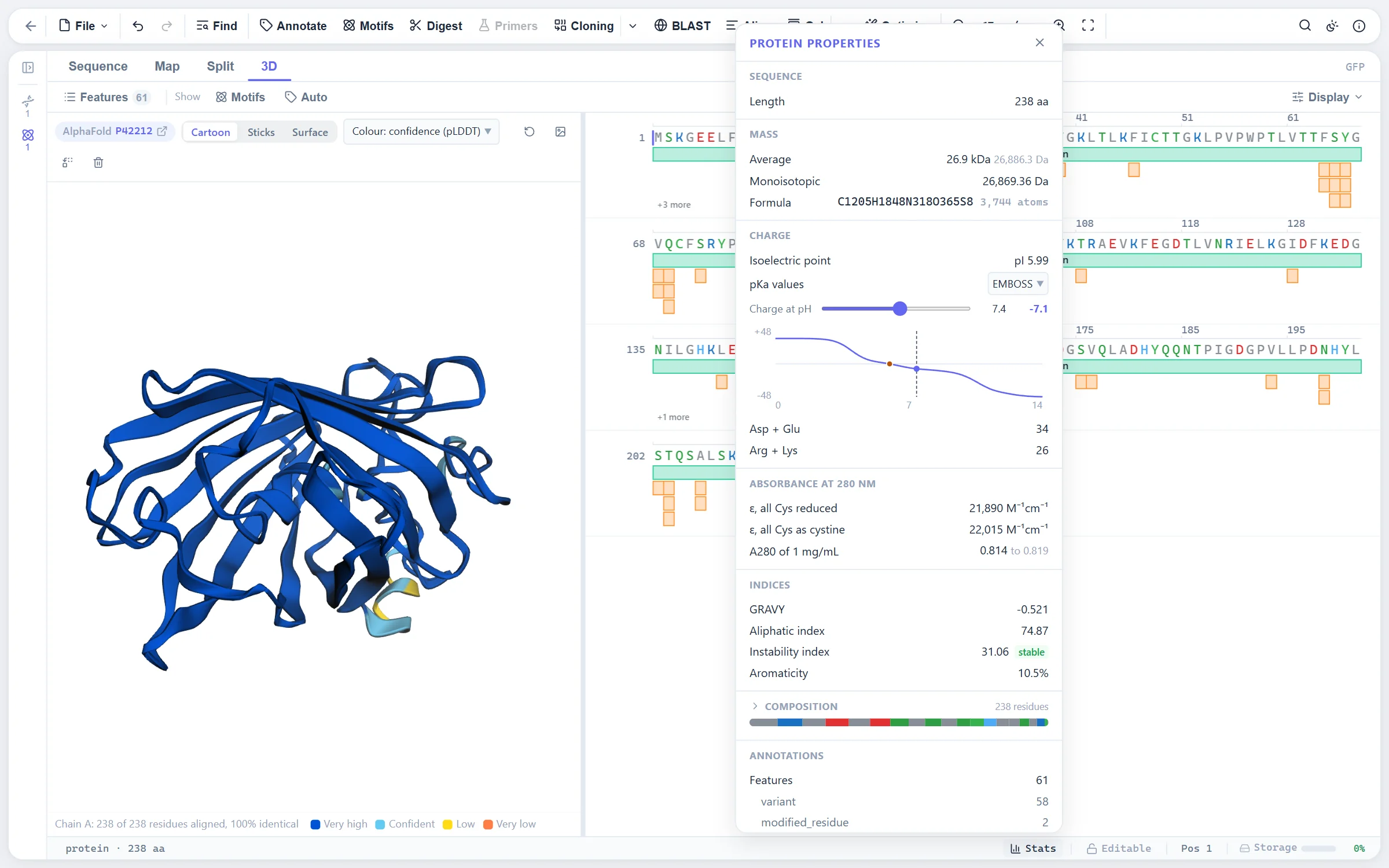
FASTA and GenPept in and out, the same viewer with residue colour schemes, and everything a protein sequence can tell you: mass, pI and charge, extinction coefficient, domains and motifs, disulfides, cleavage sites, a predicted SDS-PAGE band, secondary structure, and the 3D structure from the PDB.

GFP from UniProt with its variants drawn as a lollipop map above the sequence
The AlphaFold model of GFP beside the sequence, with the protein properties popover open
  • Linked to its codons. Translate a coding feature and the protein stays linked back to the DNA.
  • Back-translation. To a host's codon usage, with the result annotated.
  • UniProt and NCBI import. With features, variants and cross-references.
  • 3D structure. PDB and AlphaFold models rendered with 3Dmol.js, coloured by the selection in the sequence.

BDesign

Primer design with nearest-neighbour thermodynamics.

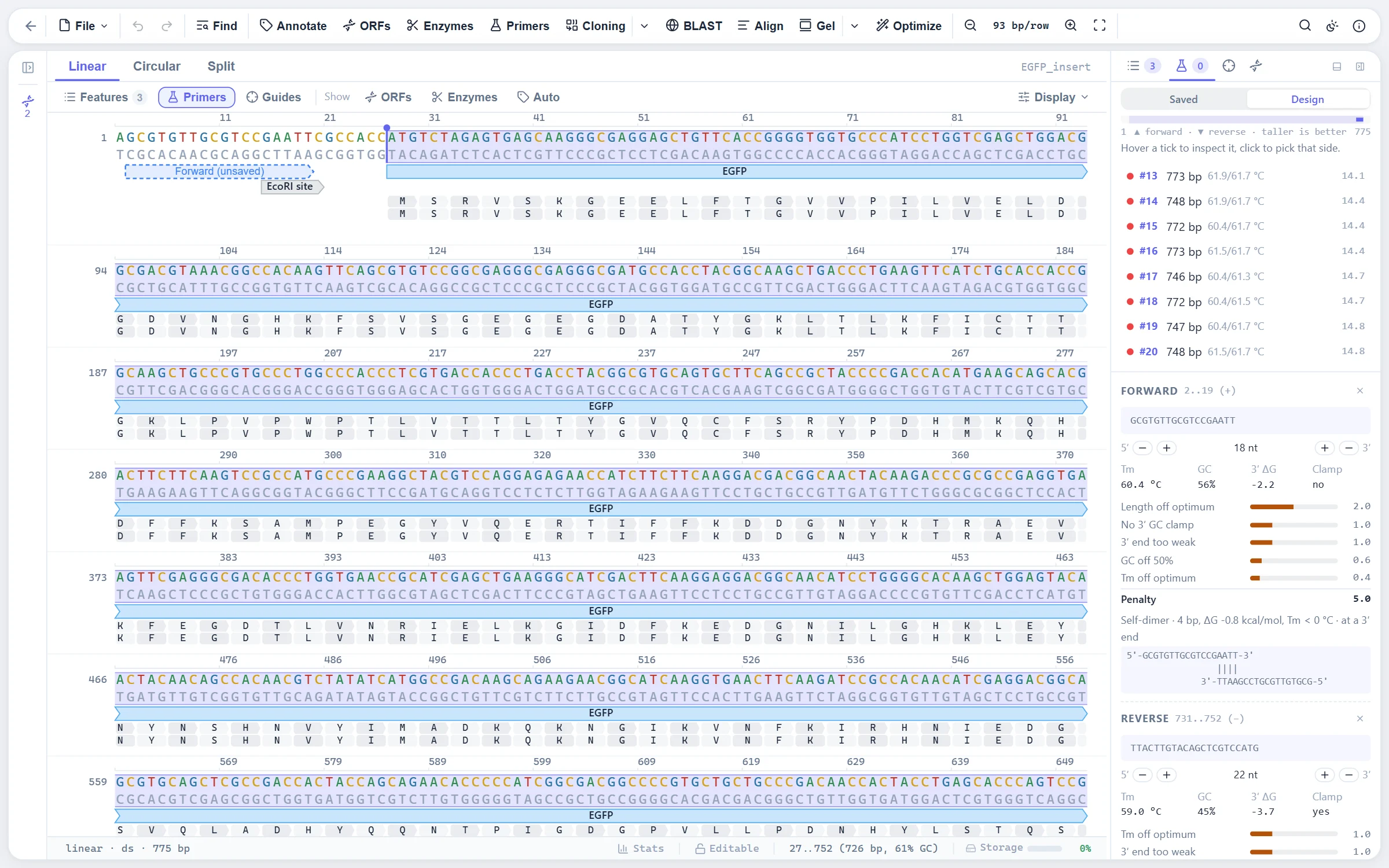
A docked design workbench with a candidate track, a per-primer inspector and live pair checks. Melting temperatures come from the nearest-neighbour model with salt and oligo corrections; hairpins and dimers are scored by their own Tm, so you can see why a candidate was rejected.

The primer design workbench with ranked pairs and the inspector showing Tm, GC, 3-prime dG and a self-dimer
  • Primers as oligos. With 5' and 3' overhangs and mismatches; binding sites are found automatically on every sequence.
  • Pair search. Product size, Tm difference and heterodimer limits you set.
  • Primer library. Keep the ones you own and find where they bind.
  • Tm on selection. Select any stretch and read its Tm in the tooltip.

How primers are designed: tasks, scoring, Tm model and defaults →

Codon optimization with host usage tables and sequence constraints.

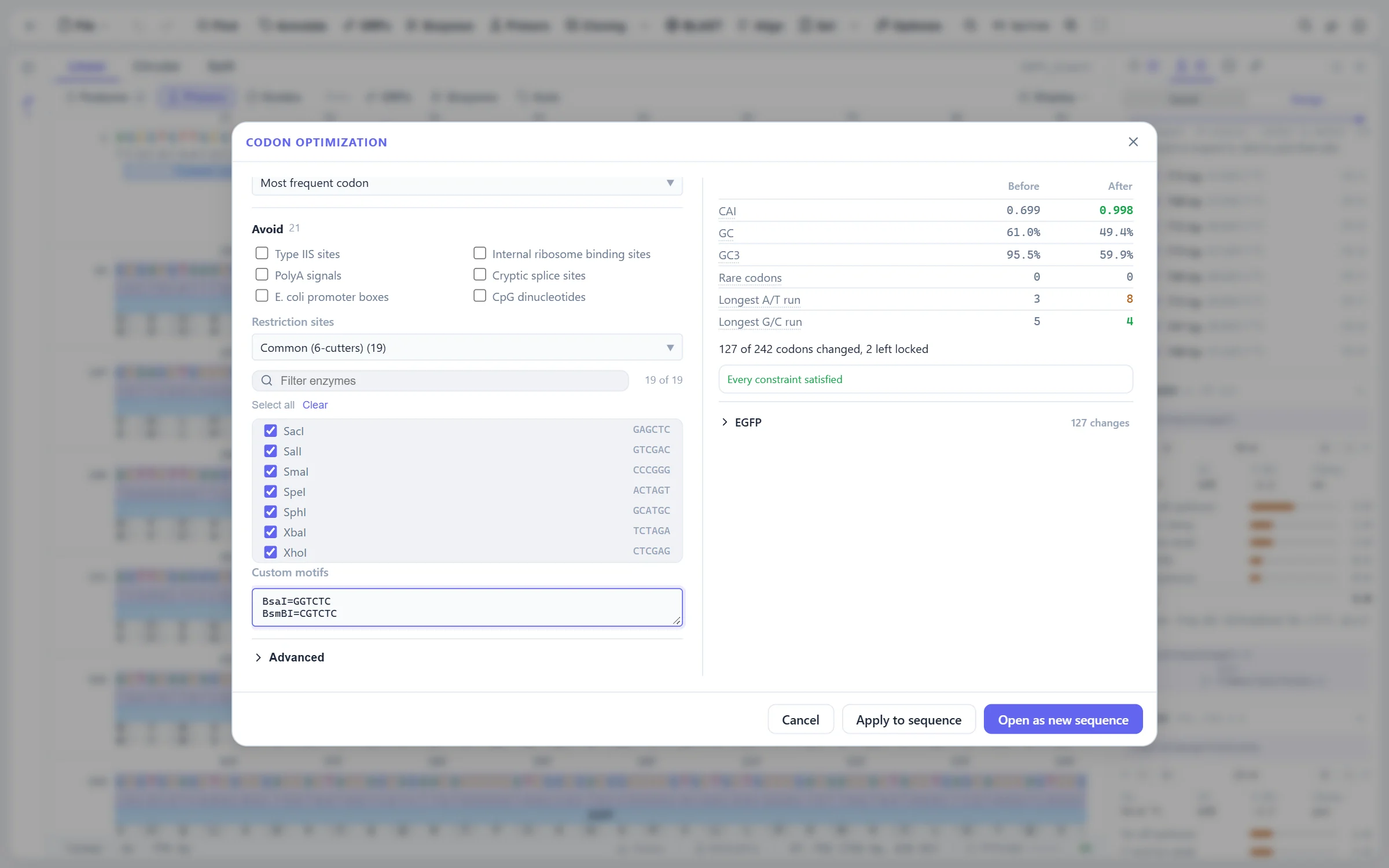
Nineteen genetic codes and host usage tables, built in or imported from EMBOSS cusp and GCG CodonFrequency. Avoid restriction sites, homopolymers, repeats and GC extremes while the protein stays exactly as it was, and read the CAI and GC profile before and after.

The codon optimization dialog with avoided restriction sites and custom motifs, and CAI and GC before and after
  • Greedy with backtracking. Keeps the best codon wherever it can and steps back only where a constraint forces it.
  • Applied as an edit. The optimized sequence replaces the coding feature in place, with undo.

How codons are chosen: usage tables, constraints and the algorithm →

CRISPR guide design, off-target search and edit verification.

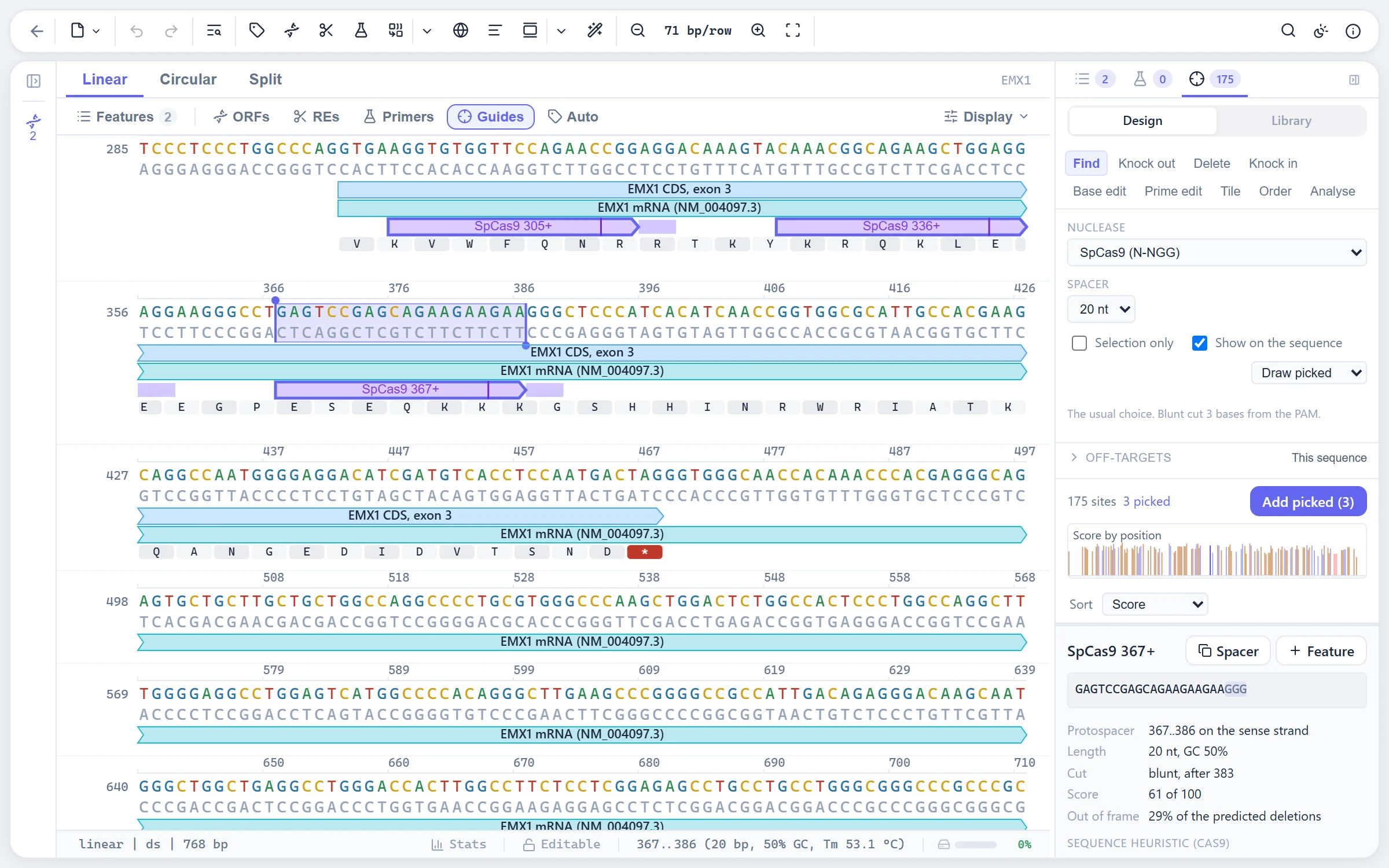
Protospacers for a dozen nucleases or one you describe yourself, scored in three separate columns: activity, the repair the break is likely to get, and the rules a spacer has to pass. Off-targets with mismatches and bulges over any sequence you name. Tasks for knocking out, deleting, knocking in, base editing and prime editing.

The CRISPR guide designer with scored guides and the PAM and cut drawn on the sequence
  • Drawn on the sequence. Every guide with its PAM and cut site; the sequence view shows them in place.
  • Donors that stay cut-proof. Knock-in donors are edited so the nuclease cannot cut them again.
  • Oligos to order. With every added base marked, a screening amplicon and the enzyme that reads it out.
  • Read the edit back. Take an edited chromatogram apart against its control, or count alleles in amplicon reads.
  • Guide library. Keep the guides you use and find them on other sequences.

How guides are scored, searched for off-targets and designed for a goal →

Cloning simulation for restriction, seamless, Golden Gate, Gateway and TOPO.

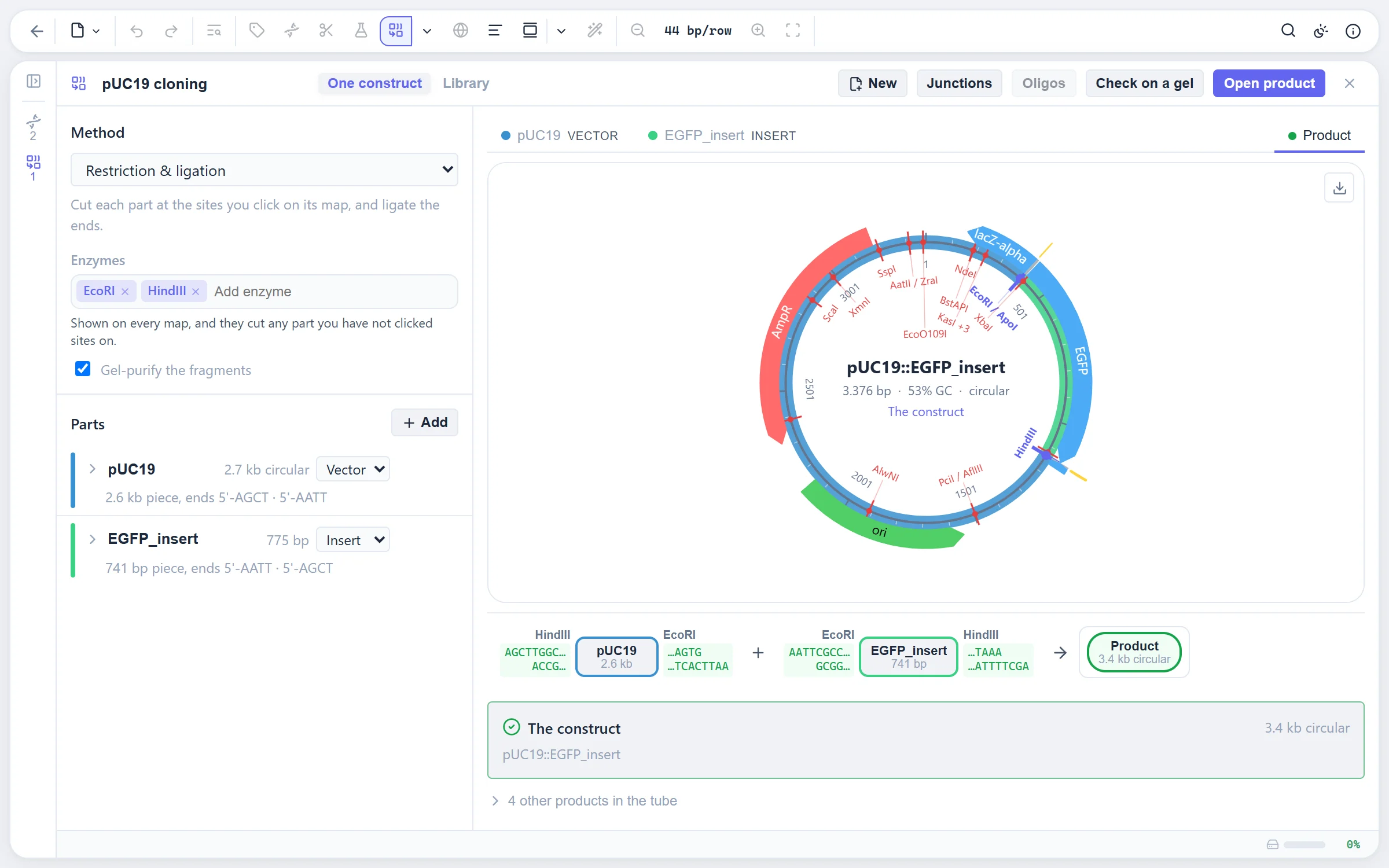
Each part is shown on its own plasmid map; click the sites to cut it and the reaction strip shows what goes into the ligation. Seamless assembly (HiFi, Gibson, In-Fusion, SLIC), Golden Gate with overhang fidelity, Gateway and TOPO follow the same path. The product keeps the vector's numbering and carries every feature across.

The cloning workspace with a vector and an insert map and the reaction strip
  • Ends and methylation. Compatible ends are checked, and sites blocked by Dam, Dcm or CpG methylation are marked.
  • Oligos to order. Primers with homology arms or Golden Gate flanks for every part that needs them.
  • Junctions and verification. Each junction read out, and a diagnostic digest that tells the right clone from the wrong ones on the virtual gel.
  • Combinatorial libraries. Several parts per slot give every product at once.

CAnalysis

Restriction site analysis with the REBASE enzyme set.

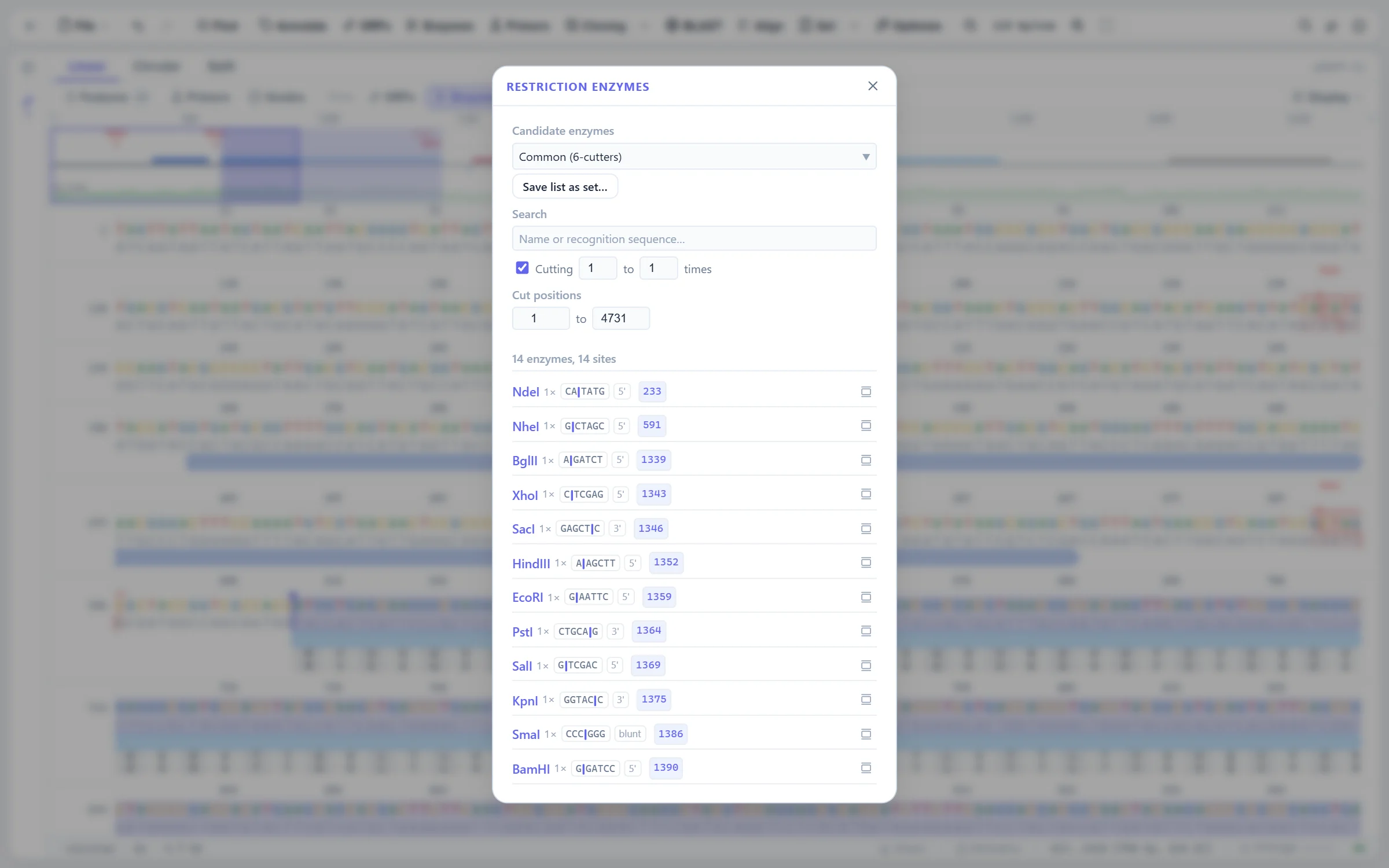
Hundreds of enzymes with their sites, overhangs, methylation sensitivity and suppliers. Filter by cut count, overhang type and commercial availability, keep sets of the enzymes you own, and see every site drawn in the sequence view and on the map.

The restriction enzyme dialog listing the single cutters of pEGFP-C1 with their sites and overhangs
The same sites drawn in the sequence view, with cut steps on both strands and names in the overview
  • Sites in the sequence. Per-line name rows, cut steps on both strands, and hover linking between the site and its name.
  • Saved enzyme sets. Your freezer, as a filter.

Virtual agarose gels with a migration model fitted to real gels.

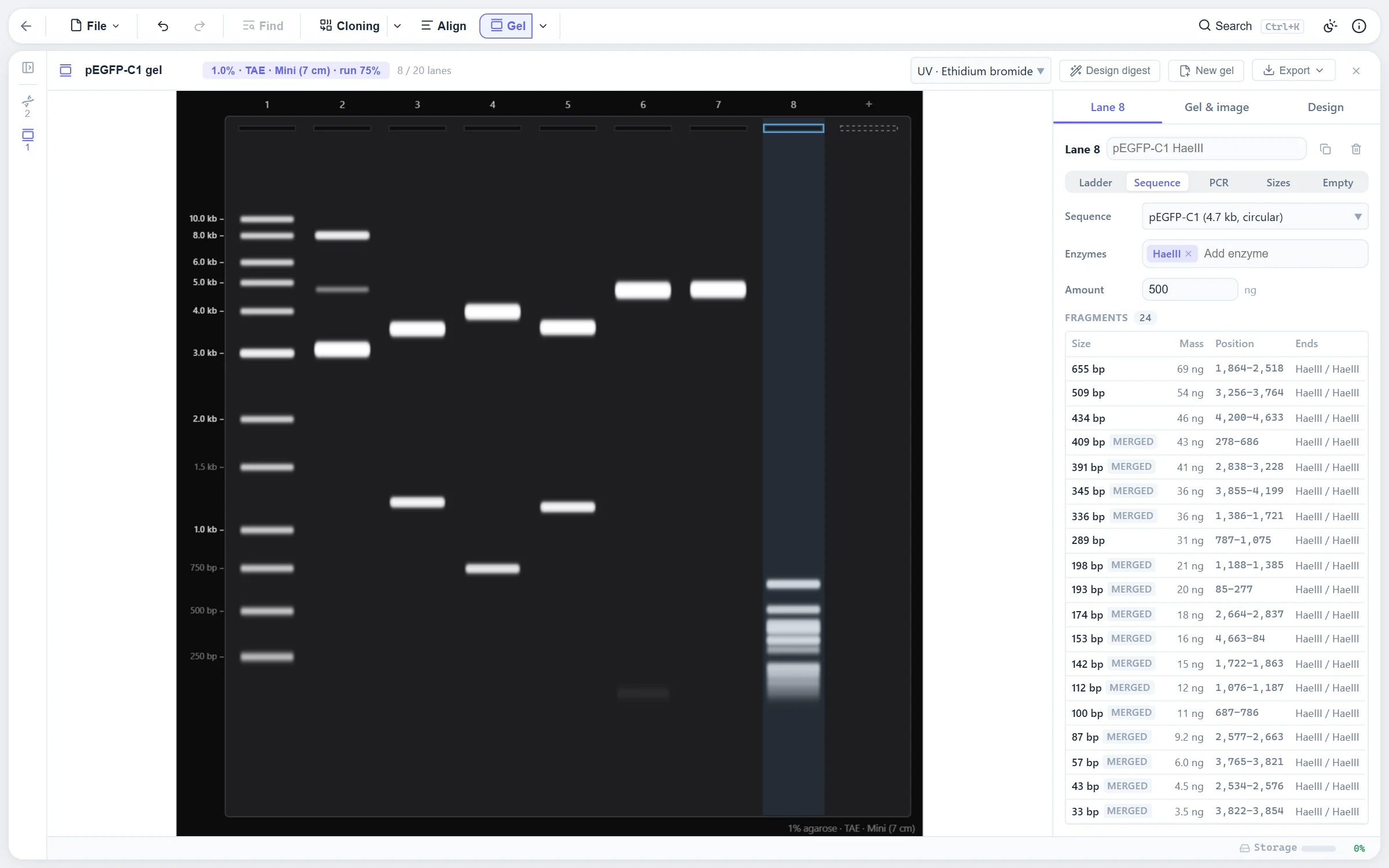
Lanes from digests, PCR products and whole plasmids, run against the ladder you use on a migration model fitted to real gels. Bands carry their size and the fragment behind them, and the diagnostic digest designer finds the enzymes that tell your clones apart.

A virtual agarose gel of pEGFP-C1 digests beside a ladder, with the fragment table of the selected lane
  • Ladders. Common commercial ladders built in; add your own.
  • Looks and export. Agarose percentage, stain and exposure; export as SVG or PNG for a figure.

How the gel is simulated: the migration model, bands, ladders and the digest designer →

Pairwise and multiple alignment with MAFFT, MUSCLE and Kalign.

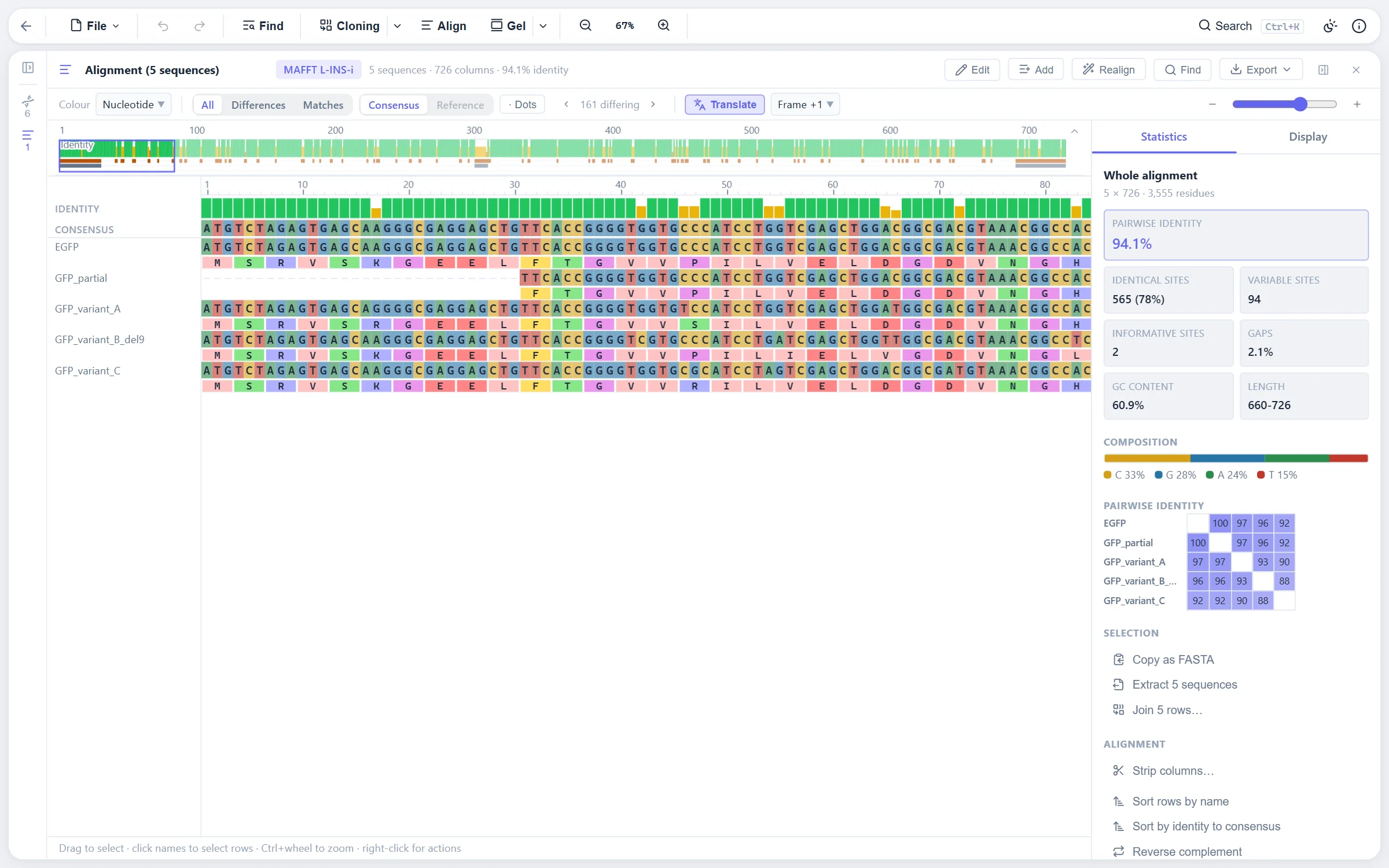
Pairwise global and local alignment with the built-in aligner, and multiple alignment with MAFFT, MUSCLE and Kalign compiled to WebAssembly. The viewer shows conservation, lets you edit gaps, add sequences and realign, and exports Clustal, PHYLIP, NEXUS and figures.

A MAFFT alignment of five GFP variants with translation rows and the statistics panel
  • Automatic engine choice. The built-in aligner for two sequences, MAFFT L-INS-i when it will finish within seconds, Kalign otherwise, with a warning before a long run.
  • Every row checked. A tool that dropped or changed a residue cannot slip a wrong alignment through.
  • Hirschberg above a size limit. Long pairwise alignments run in linear memory.

The alignment engines, the viewer and the pairwise algorithms →

NCBI BLAST searches stored with the sequence.

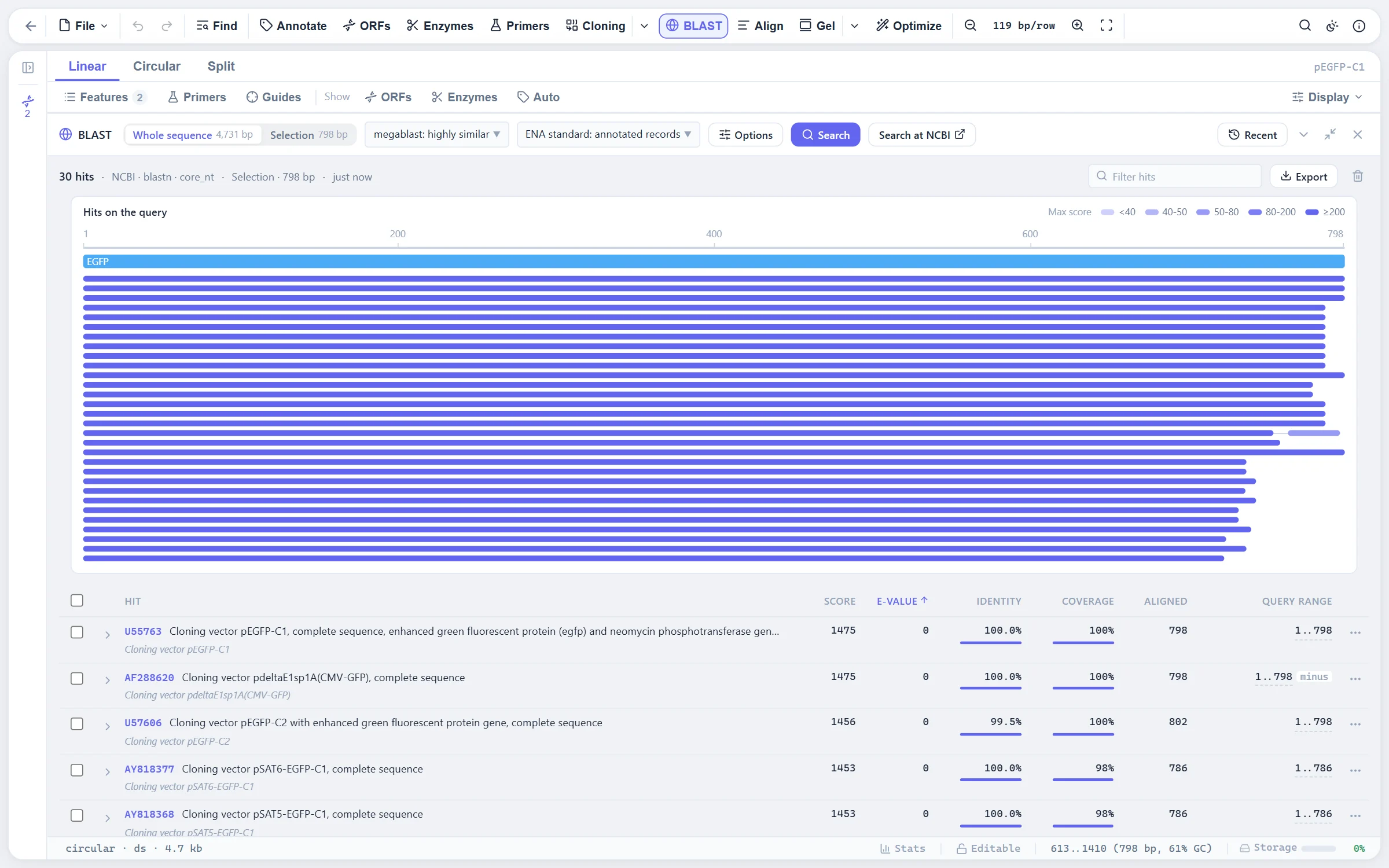
Search NCBI nucleotide and protein databases from the sequence or from a selection. Results are polled in the background, stored with the sequence so you can come back to them, filtered and sorted in a drawer under the view, and exported as a table.

An NCBI BLAST result for the EGFP coding sequence of pEGFP-C1 in the drawer: hit map over the query and the sortable hit table
  • blastp from a CDS. Translate a coding feature and search with the protein.
  • Hits as features. Keep a hit as an annotation, or fetch the hit sequence into the session.

DReads

Sanger chromatograms, contig assembly and clone verification.

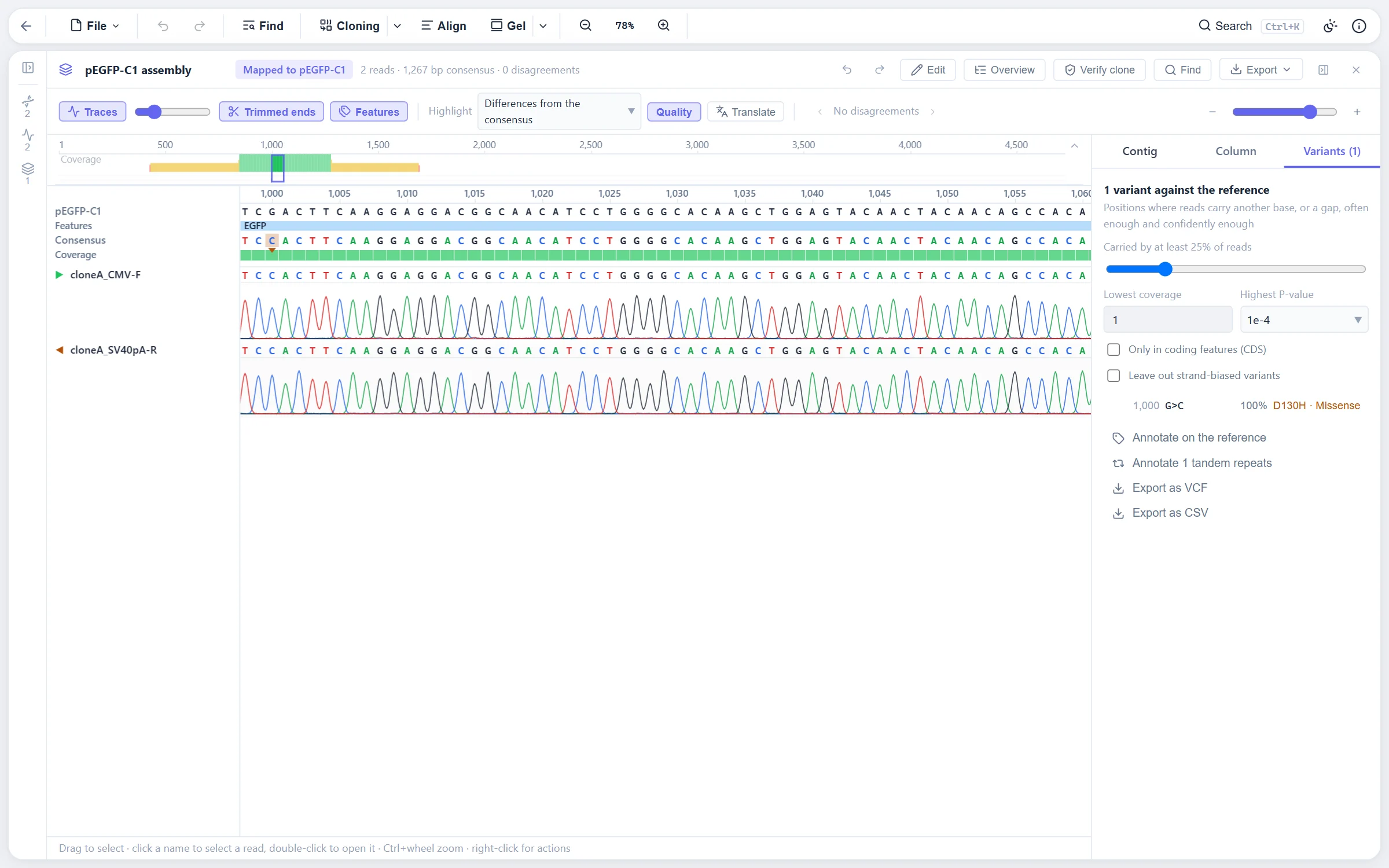
AB1 and SCF chromatograms with quality scores, base editing and trimming. Assemble reads de novo or against a reference into contigs, and verify a whole plate of clones against several references at once, with every mismatch named.

Two Sanger traces of a pEGFP-C1 clone assembled on the plasmid, with a G to C variant in EGFP called as a D130H missense
  • Assemblies and contigs. Reads grouped by name into contigs with the consensus and the trace under each base.
  • Plates of clones. One page per plate, with each clone's verdict against its reference.
  • Overview figures. Coverage and agreement across the construct, exported for the lab book.

How traces are trimmed, assembled and verified by the plate →

FASTQ read sets with quality control and trimming.

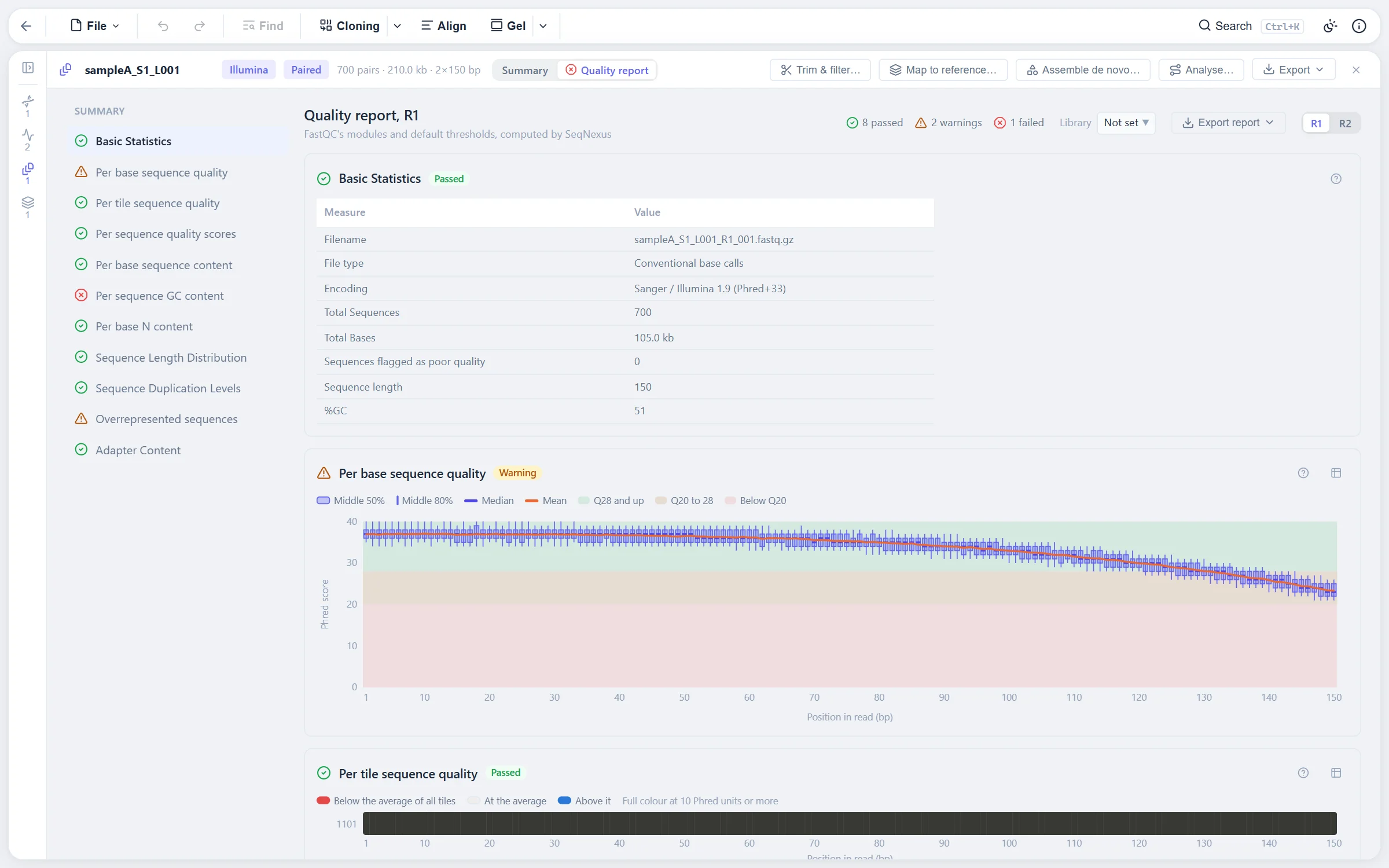
Import FASTQ and gzipped FASTQ with R1 and R2 paired automatically. A FastQC-style quality report with per-base quality, content, duplication and adapter charts and verdicts, then trimming and filtering with fastp in WebAssembly, and export of the result.

The FastQC-style quality report for a paired read set with per-module verdicts
  • Stored, not re-read. Read sets are kept in the browser's database, indexed for the viewer.
  • Verdicts, not just charts. Each QC module says pass, warn or fail and why.

Read mapping, variant calling and de novo assembly in the browser.

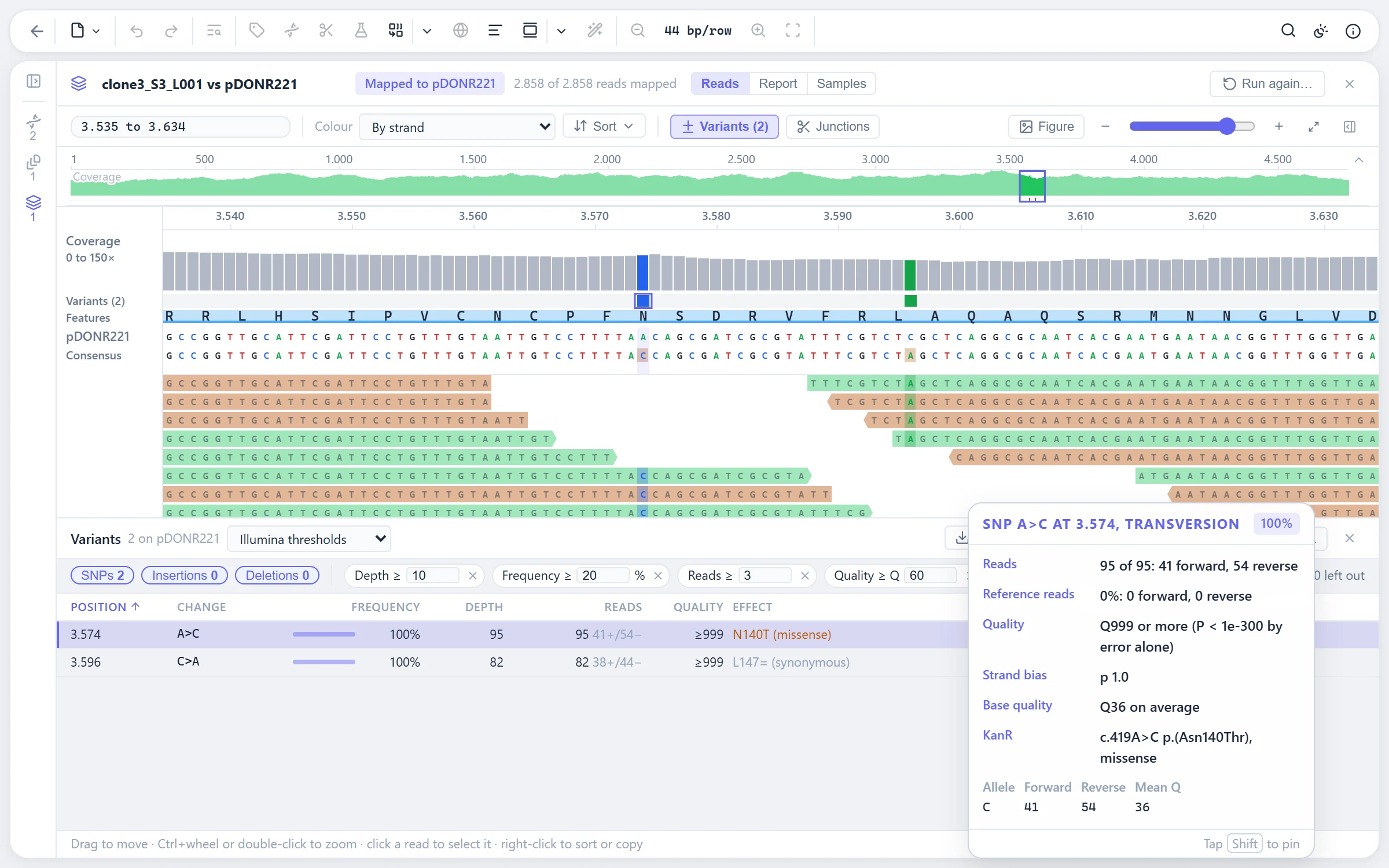
Map reads to a reference with minimap2, or assemble them first and map back. View a mapping from the whole genome down to single bases: coverage, reads coloured by strand or pair, soft-clip junctions. Call variants with live thresholds and technology presets, and read what each one does to every coding feature it falls in.

A read mapping with coverage track, reads and called variants
  • Coding effects as HGVS names them. Spliced CDSs read through their exons, frameshifts followed to their new stop, lost stops read on to the next one.
  • Several samples per mapping. A samples by variants matrix and clone verification per sample.
  • Amplicons. Primer clipping so primer bases do not count as evidence.
  • Guided pipeline. From FASTQ to consensus and VCF in one pass, with each step's result kept.
  • BAM in and out. Mappings imported from and written to BAM with their index.

How reads are mapped, variants called and contigs assembled →

EIn and out

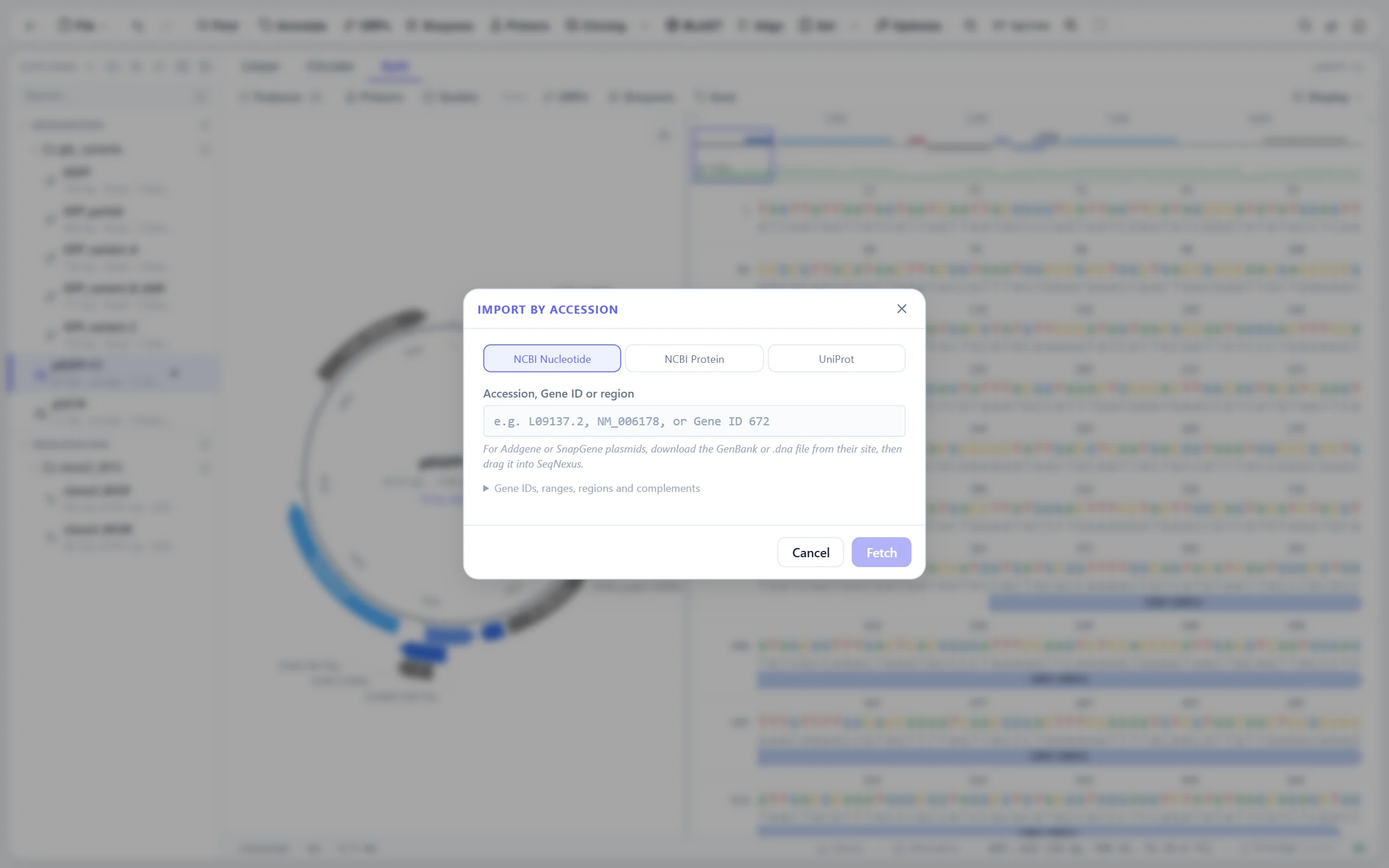
Import and export formats, and records fetched from NCBI and UniProt.

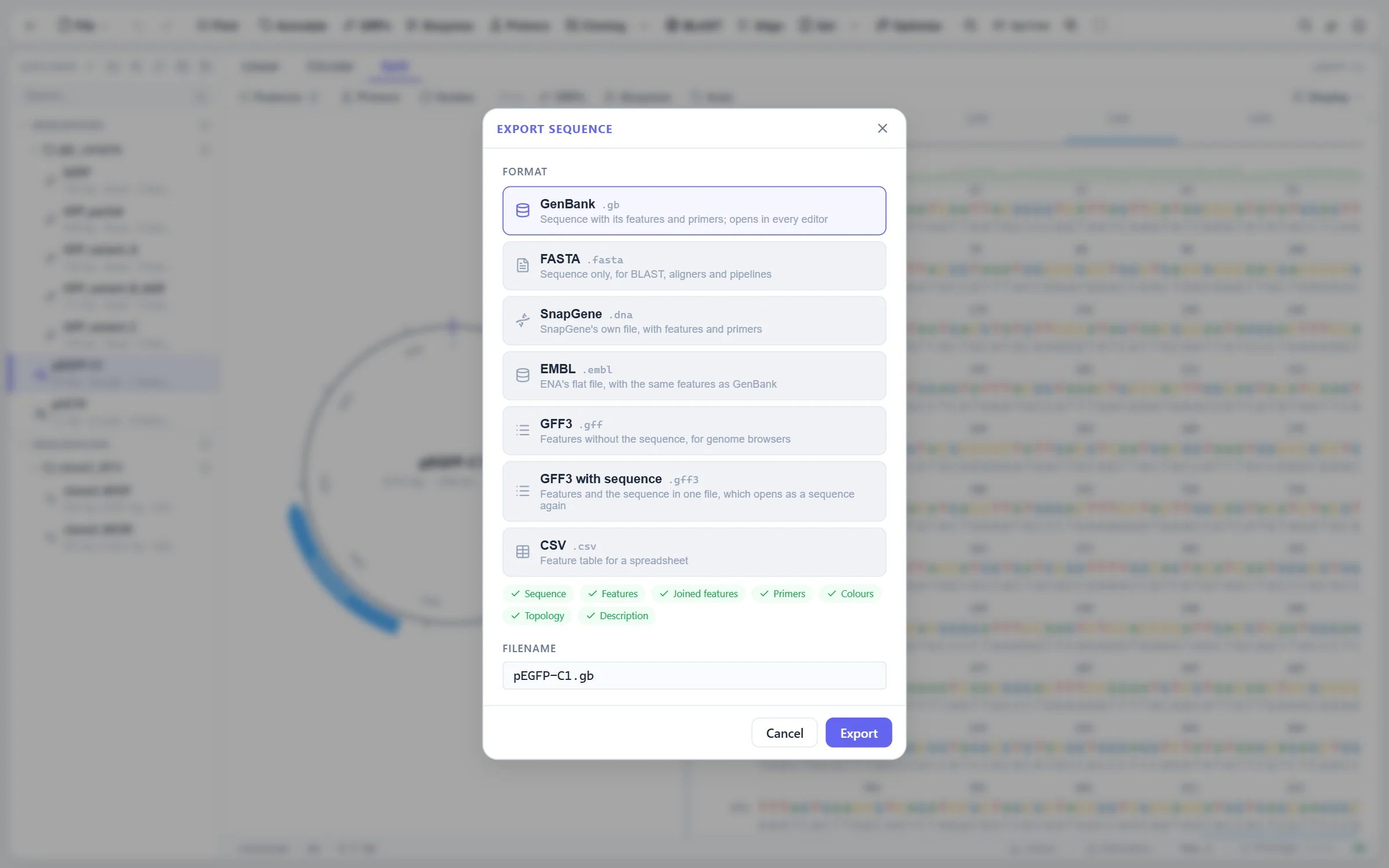
GenBank and GenPept, FASTA and FASTQ, SnapGene and Geneious, AB1 and SCF, GFF3, SAM and BAM are read; GenBank, FASTA, FASTQ, SnapGene, SAM, BAM, VCF, GFF3, CSV, Clustal, PHYLIP, NEXUS, SVG and PDF are written. Records are fetched by accession from NCBI and UniProt.

The Import by Accession dialog over an explorer holding GenBank, FASTA and AB1 files
The export dialog with its format cards
  • SnapGene and Geneious. Parsers written for this project; features, primers, topology and methylation come across, and a Geneious folder export opens whole.
  • Streaming GenBank. Large and multi-record files open without reading the whole file first.
  • Sessions. Export everything in the explorer as one file and open it on another machine.

SVG and PDF export of every view in a print palette.

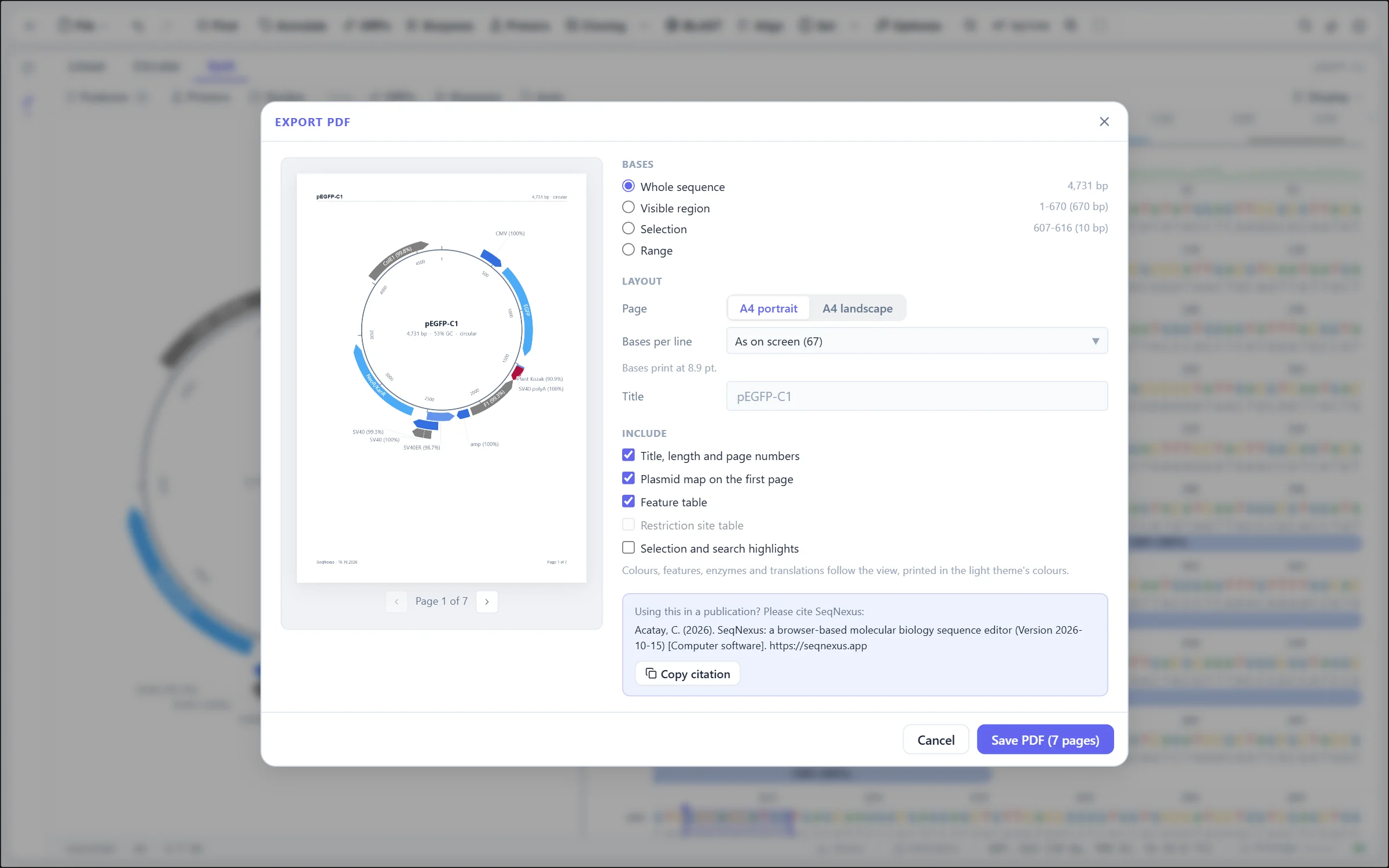
The plasmid map, the sequence with its features and enzymes, alignments, gels, assemblies and mappings all export as SVG or PDF. One painter draws the screen and the export, so the figure is the view you were looking at, in a fixed palette that does not follow the theme.

The Export PDF dialog with its page preview, map on the first page and feature table
  • PDF with tables. The sequence as the text view draws it, with an optional map page and feature and enzyme tables.
  • Editable SVG. Text stays text, so the figure can be finished in Illustrator or Inkscape.

Get started

All of it is free. Open the tab and drag in a file.

No installation, no account. Your sequences are stored on your own device and never uploaded.